Mastering Remote Meetings: How to Stop Missing Details and Stay on Top of Your Game
Ever feel like remote meetings are a total mess?
You’re not alone if you’ve ever jumped off a Zoom call wondering what just happened. Maybe the chat zoomed by too fast. Maybe you missed who said what. Or all those “action items” you thought you noted down just disappeared into the ether.
If your day feels like a blur of scattered thoughts and missed takeaways, you’re in the right place. Let’s talk about how to take back control.
What’s Really Breaking Your Meeting Flow?
Lost threads and forgotten promises: With all the rapid-fire talking and screen sharing, keeping track of important points feels impossible.
Juggling multiple tools and notepads: You try to scribble notes, track tasks, and stay present, but your brain just can’t keep up.
Meeting burnout causing foggy memory: After hours of back-to-back calls, details slip through the cracks, and follow-ups fall behind.
Private info worries: Recording meetings feels invasive or risky, so you often hesitate to capture anything formally.
Language barriers and distractions: When speakers switch languages or background noise interrupts, your focus tanks.
Imagine This: Always Knowing What Happened and What’s Next
Picture a quiet sidekick that listens in silently, catching the key points, jotting down tasks, and letting you just be in the moment. No fiddling with extra apps, no awkward bot invites, no privacy worries.
This isn’t a dream, it’s the quiet power of tools that feed you insights just for you, working behind the scenes to keep your meetings clear and actionable. So after you hang up, you get a clean, easy-to-navigate summary with every important detail and next step lined up.
Check out how easy it is to jump right to the vital parts you care about:
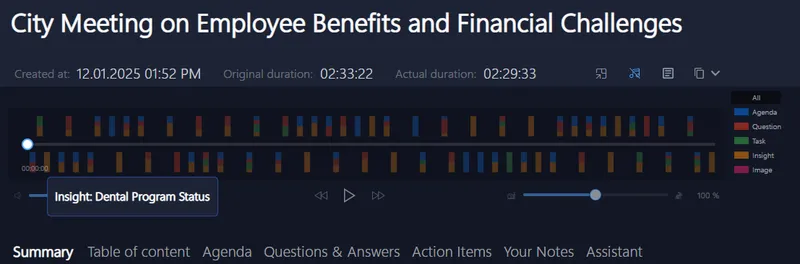
No more guessing, no more scrambling. You’re ready to act.
Why Most Meeting Tools Aren’t Cutting It
You’ve probably tried a few apps or services. But all those cloud-based assistants can feel like they’re watching over your shoulder or invite tons of complexity into your meeting with bot attendees. And let’s face it, juggling extra software just adds to your workload.
Plus, the risk of your company’s confidential info floating around online messes with your peace of mind. It’s why some features feel great but never really get used.
The fix? A solution that listens locally, respects your privacy, and supports your flow without throwing a wrench in the works.
Give It a Spin on Your Next Remote Call
Next time you’re heading into a call on Zoom, Teams, Google Meet, or any platform, try letting your digital assistant take notes for you silently. It works right on your device, no bots or extra invites, just smart help.
You’ll find yourself focusing more on what matters, not scrambling after the fact.
Works well for sales pros, trainers, recruiters, or anyone owning remote teamwork.
Quick Tips for Smarter Remote Meeting Success
- Keep your meeting space clear of distractions, you’ll hear the key points better.
- Use a tool that captures audio directly from your system, no extra joins or software needed.
- Don’t rely only on memory; having a transcript or summary improves your follow-up game.
Want to see how this looks live? Check out Meeting Buddy’s Live Tools for a peek at real-time summaries and speaker tracking that just makes meetings easier.
You’re not alone in feeling overwhelmed by remote meetings. But with the right quiet helper, more clarity and less stress are just a click away.
Empower your days and reclaim your focus.
Crafted with insights from Meeting Buddy, where privacy-first AI meets effortless meeting mastery.
Last update: 06 09 2025
