How to Stop Feeling Overwhelmed by Remote Meeting Chaos and Finally Take Control
Ever felt like your remote meetings just suck the life out of your day? You’re nodding along or multitasking just to survive, but somehow, you still miss key parts. Then there’s the avalanche of scattered notes, forgotten tasks, and unclear follow-ups. If this sounds all too familiar, guess what? You’re not alone. And yes, there’s a way to tame this mess without hiring a full-time assistant.
The Daily Meeting Struggles We All Know Too Well
- "There’s too much talking and not enough clarity, I leave thinking, what was I supposed to do next?"
- "Juggling multiple apps just to find what was said in a meeting? Nightmare."
- "Some meetings run way over time, with tons of off-topic chatter that ruins my focus."
- "I hate feeling like I’m the only one taking notes, but typing kills my engagement."
- "Privacy matters, I don’t want bots or weird software snooping in on sensitive company talks."
Sound familiar? Those frustrations hit especially hard when you’re juggling a remote team across different time zones and languages. You want your meetings to be productive, clear, and private , but the reality falls short.
Imagine This: Meetings That Work For You Instead of Against You
What if your meetings didn’t require you to scramble for notes or rely on memory? Picture sitting back, fully present, while a silent digital helper listens in. It captures what’s important, highlights the action items, and puts everything neatly in front of you without any distractions. Plus, it respects your privacy by keeping everything on your device, no third-party eavesdropping.
With this level of support, you could:
- Stay laser-focused, knowing there’s a backup catching every point.
- Navigate past meetings with a simple click, jumping straight to moments that matter.
- Quickly review key questions, answers, and tasks without sifting endlessly.
- Keep your sensitive conversations private and secure, so no trust barriers get in the way.
Take a peek at how a clean and organized meeting summary can look:

Why Most Meeting Tools Just Don’t Cut It
Video calls and chat apps are great , but they don’t fix the root problems:
- Bots that join your meetings can be a privacy nightmare and distract teammates.
- Relying on cloud services means you lose control over your sensitive info.
- Post-meeting recaps are often manual or missing key information.
- Multiple languages, accents, and noisy backgrounds confuse many AI helpers.
The gap is clear: you need a seamless, private way to keep up with meetings and action items without bogging you down.
Ready for Your Next Meeting to Actually Work for You?
Try this approach next call: use a smart assistant that automatically kicks in once the meeting starts, listens quietly on your device, and delivers crystal-clear summaries right after. No bots, no invites, just you and your best virtual co-pilot.
It’s already helping salespeople, recruiters, consultants, coaches, and agencies cut through the noise. Best of all, it’s compatible with Signal, Zoom, Teams, Google Meet, Webex, and many more, fitting right into your current workflow.
See how the real-time AI keeps track of speakers in your preferred language, keeping everything clear:
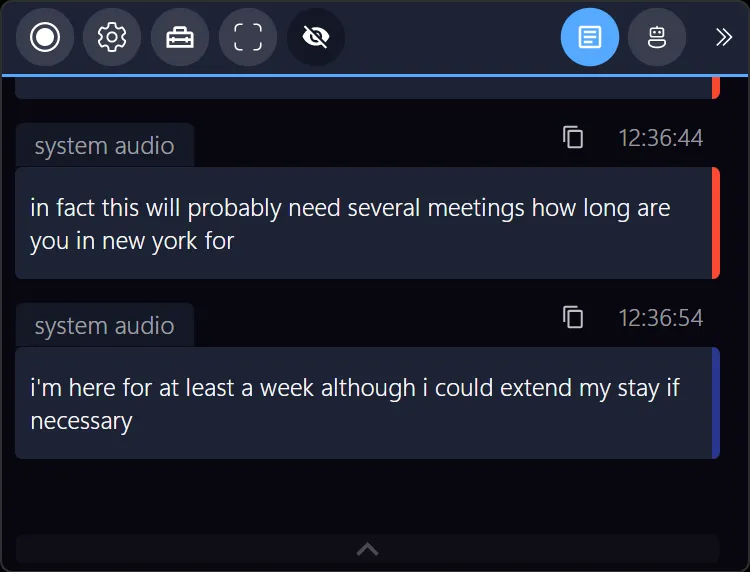
Say goodbye to guessing or scrambling after calls, you’ll have the focus and insights you need.
Let’s Recap
Remote meetings don’t have to drain you. With the right silent assistant, you get back your focus, privacy, and productivity. It’s not about adding new friction. It’s about removing the noise so your team can actually get stuff done without the usual headaches.
If you’re tired of fading in and out of virtual calls, scrambling through notes, and struggling to keep your data safe, imagine the relief of having a smart sidekick doing the heavy lifting quietly and securely.
Explore more about this private and seamless support at Meeting Buddy’s homepage and see how it fits smoothly into your daily calls.
Written by a Virtual Team Collaboration Coach who understands the struggle and believes in smarter meetings for everyone.
Last update: 06 09 2025
