Mastering Remote Meetings as an Executive Creative Director How to Keep Your Focus and Privacy Intact
Are you tired of remote meetings that drain your creativity instead of fueling it? You’re not alone. Endless online calls with distractions, unclear notes, and privacy concerns can zap your energy and hold back your team's potential. But what if you could reclaim control of your meeting time and get back to what you do best?
Do These Meeting Struggles Sound Familiar?
- Sitting through calls where you miss key points because you’re juggling screen shares, chat, and trying to take notes.
- Feeling uneasy about who’s listening , or if your confidential ideas are truly secure in cloud-based recording tools.
- The frustration of losing track of action items and follow-ups buried in long transcripts.
- Wasting time scrubbing audio to cut out background noise or awkward silences, just to understand what was said.
- Juggling multiple platforms like Zoom, Teams, and Google Meet without a smooth way to track what happened.
If you’re nodding, it’s time to rethink how your meeting tech supports your leadership.
Imagine a Meeting Sidekick That Works Quietly for You
Picture this: You join a remote meeting, and everything happens seamlessly behind the scenes. There’s no awkward bot joining your call, no pauses to toggle recording, and no worries about data slipping into the cloud. Instead, a trusted assistant on your own device listens silently, cutting out noise, tracking who said what in real time, and capturing ideas just as they come.
After the meeting, instead of sifting through hours of audio or scattered notes, you get a crisp summary highlighting tasks, key moments, and questions that need answers , all in an easy-to-navigate format that fits your workflow. It’s like having your personal co-pilot that respects your privacy but never misses a beat.

Why Most Meeting Tools Leave You Wanting More
Many popular meeting tools require you to add recording bots or invite third-party software into your calls. This not only disrupts the natural flow, but raises privacy red flags, especially when sensitive brainstorming or strategy is on the table. Plus, these solutions often dump your data in the cloud, creating compliance headaches and the risk of leaks.
Meanwhile, trying to manually keep track of speakers, notes, and tasks wastes your energy better spent leading creative vision and making decisions.
The disconnect between tech and real-world needs means you compromise either privacy or productivity, never both.
Give It a Spin During Your Next Meeting
Ready to reclaim your meeting mojo? This discreet AI assistant works on your own device, listening directly to your system audio while you stay fully in the driver’s seat. No bots invited, no disruptions.
It plays nicely with Zoom, Teams, Google Meet, Webex, and more. Sales pros, consultants, coaches, recruiters, and agencies are already benefiting.
Why not join them with zero learning curve? Just show up, talk, and let your trusted assistant do the heavy lifting , so you can focus on leading and creating.
See the Difference for Yourself
Navigate complex meetings easily with a clean table of contents for quick access to any discussion point.

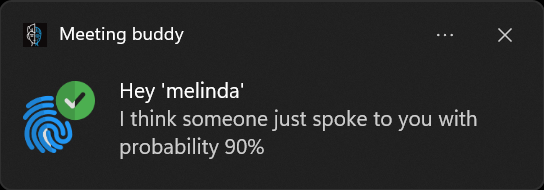
Jump back instantly to moments where your name or key topics came up with smart audio fingerprinting.
Keep your focus without the usual background noise or dead air, thanks to AI-powered noise cancellation and silence trimming.

Take the guesswork and hassle out of your meetings. It’s the quiet revolution in how creative leaders stay organized, focused, and secure.
For more details, see Meeting Buddy Features and Privacy Commitment.
Written for Executive Creative Directors who demand privacy, clarity, and control from their remote meetings.
Last update: 06 11 2025
