Master Remote Meetings Without Losing Your Mind How to Stay in Control and Actually Understand Every Word
Ever feel like your remote meetings are a blur? You’re not alone.
If you’re a Remote Strategic Planning Director, you know the chaos of juggling multiple calls, scrambling to catch key points, and trying to remember who said what. It’s frustrating, exhausting, and often feels like precious time slipping away. But what if you could get your meetings under control, without adding more hassle?
The real struggle behind your remote meetings , sound familiar?
- You join a call, only to battle spotty audio or background noise, making it hard to catch the crucial bits.
- Trying to take notes while staying engaged feels like a circus act, and important details slip through the cracks.
- After meetings, you waste time replaying parts or sifting through vague notes that make no sense.
- You worry about privacy every time you invite recording bots or third-party tools , sensitive discussions aren’t something you want floating around in the cloud.
- Jumping between Zoom, Teams, and Google Meet, you feel like you need a different tool for each platform.
What if your remote meetings could work smarter, not harder?
Imagine this: As soon as your meeting starts, an invisible assistant is there by your side. It listens, tracks who's speaking, filters out annoying background noise, and quietly takes detailed notes for you. No disruptions. No awkward bot invites. Just a crystal-clear transcript you can search anytime.
After the call, you get a neat summary highlighting the key takeaways, action items, and questions , all ready to share or revisit without the usual headache. You’re not scrambling to remember who committed to what.
This kind of support doesn’t interrupt your flow or distract your team. It just works silently, giving you back your focus and peace of mind.

Why your current tools might be missing the mark
Most meeting assistants require inviting bots or uploading your audio to the cloud , which means privacy concerns and possible security risks. Plus, juggling multiple apps that don’t talk to each other wastes your time and energy.
Some tools only give you transcripts after the fact, leaving you stranded during the meeting. Others force you to manually input information or fiddle with complicated setups, taking you away from what really matters: strategic conversation.
What if you had something that could live quietly on your device, working seamlessly with every platform you use, and giving you instant insights without leaving your data vulnerable?
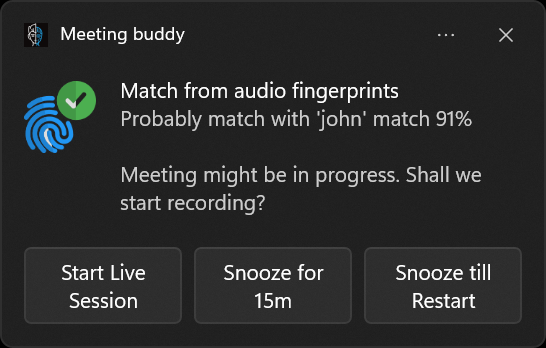
Next call hack: try an ultra-private AI meeting sidekick
Give meeting control back to yourself without the tech fuss. This AI assistant listens only to you and processes everything locally , meaning your confidential strategies stay private.
Does it work with your meeting platforms? Yes. Signal, Zoom, Teams, Google Meet, Webex, and more , no extra bots to invite, just real-time support that respects your flow.
Professionals from sales to consulting and recruiting rely on this type of invisible meeting helper to cut distractions and increase clarity. And the best part? It’s easy to start, with zero learning curve.
Try it on your next call. Focus on what matters. No distractions. No privacy worries.
Content inspired by the ultra-private AI meeting assistant Meeting Buddy, created by Ing. Jan Janusek. For deeper meeting insights and privacy-focused remote collaboration, visit Meeting Buddy Live Tools and Analytics.
Last update: 06 08 2025
