How to Win Back Your Time in Remote Meetings as a Portfolio Manager
Do you ever feel like your remote client meetings are a whirlwind of distractions, missed details, and endless note-taking? You're definitely not alone. Managing client portfolios remotely means you're juggling a lot, and poorly organized meetings only add to the chaos. But what if you could regain control and make every meeting truly count?
The Real Struggles of Remote Portfolio Managers
Let's be honest. Remote meetings can feel like:
- Juggling conversations without clear notes or summaries
- Losing track of critical action items buried in chat or scattered in your head
- Straining to remember who said what, especially with multiple clients in different time zones
- Scrambling to multitask and still actively listen
- Facing tech glitches that kill the flow and waste your time
Sound familiar? It’s tough when your meeting tools don’t support the real rhythm of your work.
What If Your Meetings Actually Worked for You?
Imagine joining a remote meeting knowing you won't have to furiously type notes or replay long recordings to find key moments. Instead, a quiet companion listens alongside you, capturing everything, so you can focus on the conversation.
This means:
- Seamless meeting flow without distractions
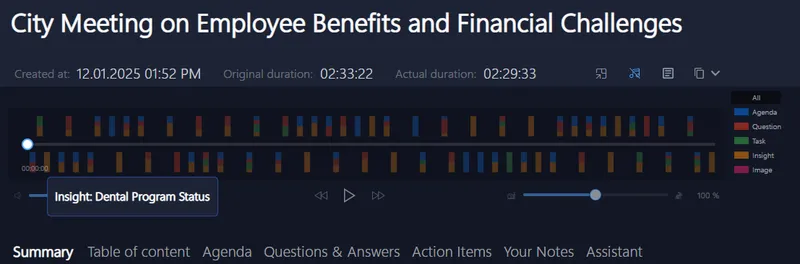
- Instant highlights that pull out tasks, key decisions, and questions
- Effortlessly navigating through meeting parts without hunting for timestamps
- Getting back to your clients faster with clear follow-ups and actionable insights
- Enjoying privacy because your meeting data never leaves your device, no shady cloud sharing
Why Traditional Meeting Tools Miss the Mark
You've tried countless apps that promise to streamline your meetings. Yet, most fall short because they:
- Require adding bots or extra participants, making meetings awkward or slow
- Send audio and data to the cloud, raising privacy concerns
- Interrupt your natural workflow with clunky, manual note-taking
- Provide generalized AI that doesn't really understand your portfolio jargon
- Create more work after the meeting instead of saving you time
You deserve better, something that works invisibly and just for you.
Try It on Your Next Client Session
Give yourself a break and test a tool that supports you quietly during your calls. It’s ready to roll without complicated setups or fiddly install hoops.
- Works smoothly with Zoom, Teams, Google Meet, Signal, Webex, and many others
- Loved by portfolio managers, consultants, and client-facing pros who need reliable insights
- Auto-starts recording with a gentle prompt, no interruptions
- Handles multiple languages and filters out background noise so you hear only what matters
Why not reclaim your meeting sanity tomorrow?
For more tips on managing your remote client interactions effectively, visit Meeting Buddy’s Analytics page.
Last update: 05 26 2025
