How to Stop Getting Lost in Remote Meetings and Start Owning Your Time
Ever felt like you just spent an hour on a Zoom call, but can’t remember half of what was said? You’re not alone. Endless remote meetings can drain your brain and eat your day.
If you’re a Remote Business Forum Moderator, juggling conversations, tracking who said what, and following up with tasks feels like a full-time job on top of your job. The struggle to stay organized during chaotic digital sessions is real.
What’s Really Driving You Crazy in Remote Meetings?
- Meetings that run long because no one keeps track of key points.
- Jumping back and forth to find where that important action item or decision happened.
- Trying to pay attention while scrambling to take notes (and missing half the discussion).
- Feeling distracted by audio glitches, background noise, or people talking over each other.
- Worrying about sharing sensitive info when meeting tools invite bots or outsiders into the call.
Sound familiar? It’s hard to focus and be a great moderator when all these distractions pile up.
Imagine Your Next Remote Meeting Going Smoothly
What if you could tune into conversations without panicking about missing something?
Imagine having your own invisible assistant that listens in silently, keeps track of who said what, and organizes the whole meeting into clear, searchable notes and tasks. It reminds you to record, removes background noise, and even whispers key highlights right when they happen.
It doesn’t ask you to add bulky bots or change your whole workflow. It just works quietly on your own device, so you keep control and your chats stay ultra-private.
Here’s a peek at how your meeting summaries might look:

Why Most Meeting Tools Don’t Cut It
You might already use big-name apps that promise transcripts or recordings. But they often:
- Force you to invite extra bots, which can make everyone uneasy.
- Send your data through the cloud, risking privacy leaks.
- Require awkward manual steps like starting separate recordings or typing notes live.
- Miss speaker identities, so you can’t tell who said what.
- Struggle with noisy calls or multilingual teams.
These hiccups slow you down and add stress, instead of lightening your load.
Try Meeting Buddy on Your Next Call
Give your next remote meeting a secret edge. Meeting Buddy works discreetly alongside your favorite platforms like Signal, Zoom, Teams, Google Meet, and Webex , no clunky installs or bot invites.
Moderators, sales pros, consultants, recruiters, and agencies use it to stay on top without extra hassle. It joins your system’s audio directly and listens quietly.
No fiddling with complicated settings. Just start your meeting, and Meeting Buddy prompts you to record, captures every moment, and delivers crystal-clear summaries after.
Need to jump back to a specific moment? Audio fingerprinting means you can instantly find when your name or a key term was said.
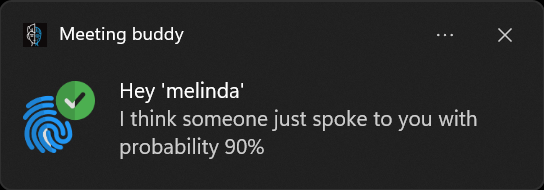
Getting the hang of remote meeting moderation demands tools that empower, not distract you. Meeting Buddy slides into your workflow seamlessly while respecting your privacy and focus.
For more on how this discreet assistant can revolutionize your meetings, check out Meeting Buddy Homepage.
Post by a team that truly gets the remote meeting grind. Learn more about their commitment to your privacy and effective collaboration at the Privacy Commitment page.
Last update: 06 05 2025
